CASE STUDY 01

CASE STUDY 01

House of Travel Holdings

House of Travel Holdings

House of Travel Holdings

At House of Travel, I had the opportunity to help shape how UX design was understood and applied across the business. While I was initially brought in for project-based work across five value streams, the role quickly evolved into something broader—embedding design into everyday workflows and helping teams adopt a more human-centred mindset.

Establishing UX Practice

Establishing UX Practice

Establishing UX Practice

House of Travel did not have an embedded UX practice when I joined. The first challenge was not only designing screens, but helping teams understand where design fit in their existing delivery rhythm.

WHAT WAS ACHIEVED
  • I hosted Figma and Figjam workshops to introduce teams to finding their way around the tools and extracting relevant information.

  • I ran onboarding workshops and Q & A sessions to help teams understand the difference between UX, UI, BA and Product responsibilities. I used these to identify collaboration opportunities and best practices for where there was crossover in the roles.

  • I created a library of shared resources from my workshop notes (both in Figma and in the Devops Wiki) to help teams understand how to use their Design resources efffectively.

  • I established a Figma structure of files and resource material that made design work easier to find, share and maintain.

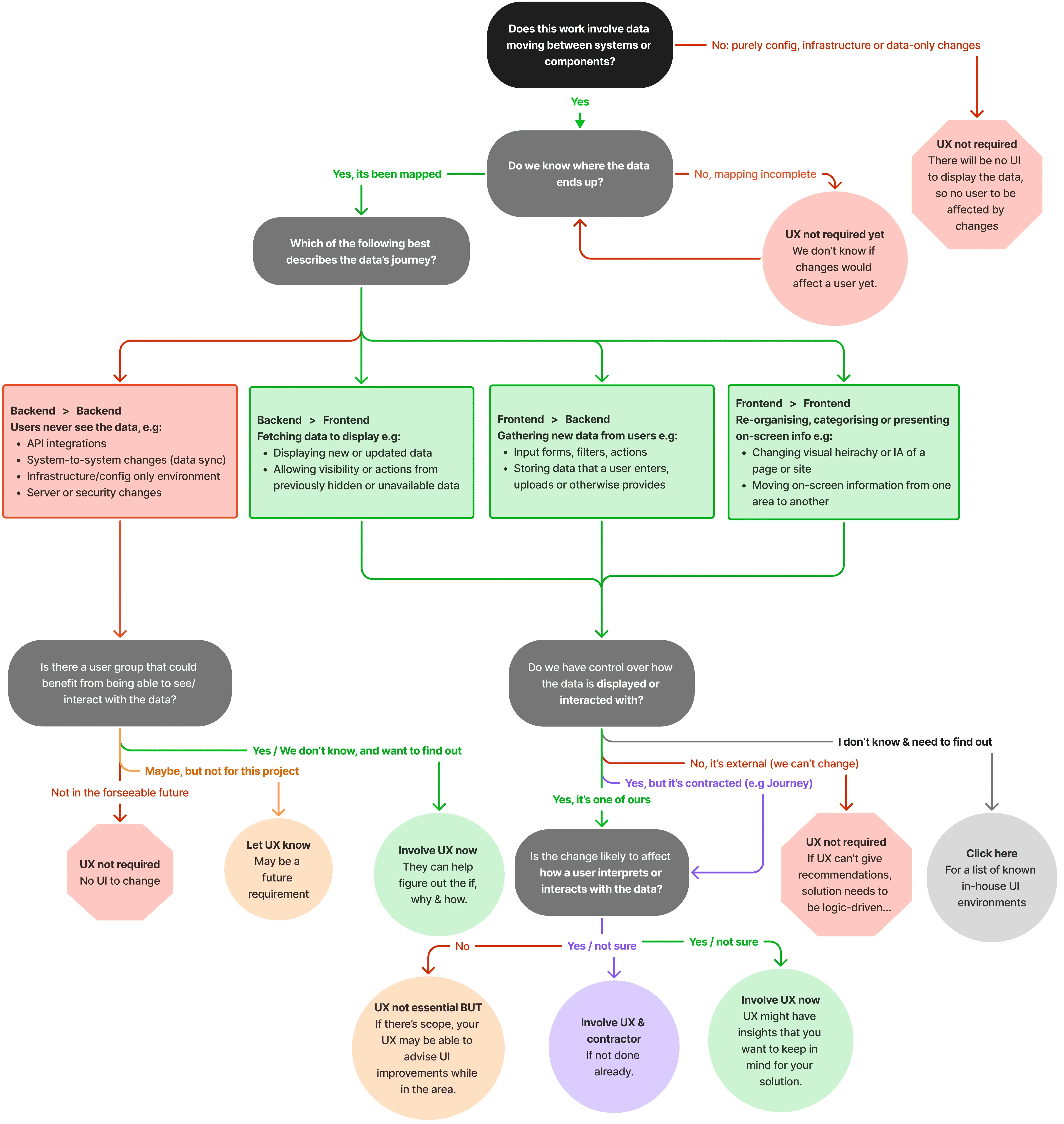
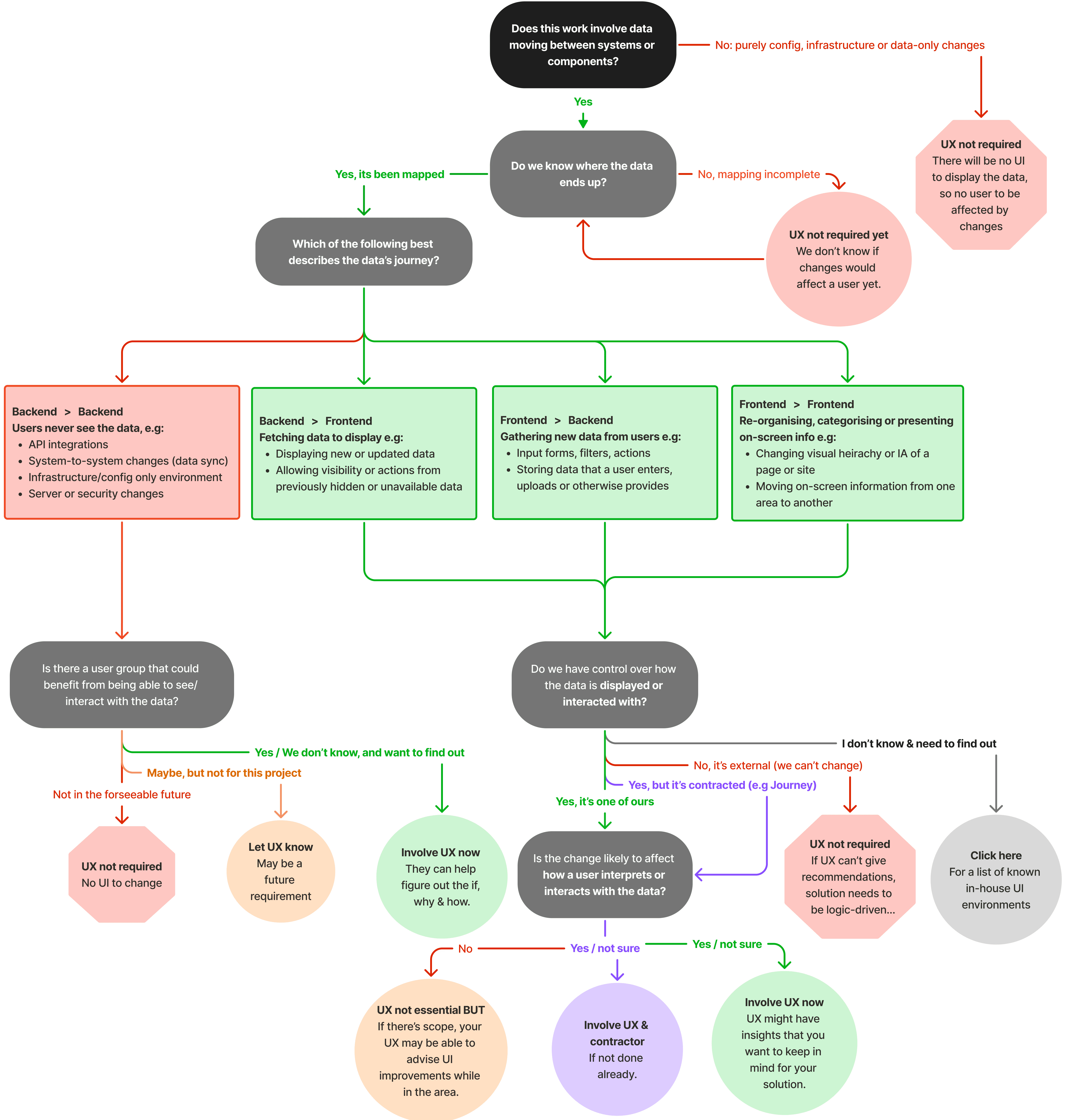
A UX delivery flowchart, to help establish a shared language and a clearer intake model for teams to decide when to involve design.
Tripbuilder Checkout API

Tripbuilder gave travel consultants a way to manage multi-stop itinerary bookings, but the checkout experience still relied on manual entry for information the business already had in its mid-office booking system.

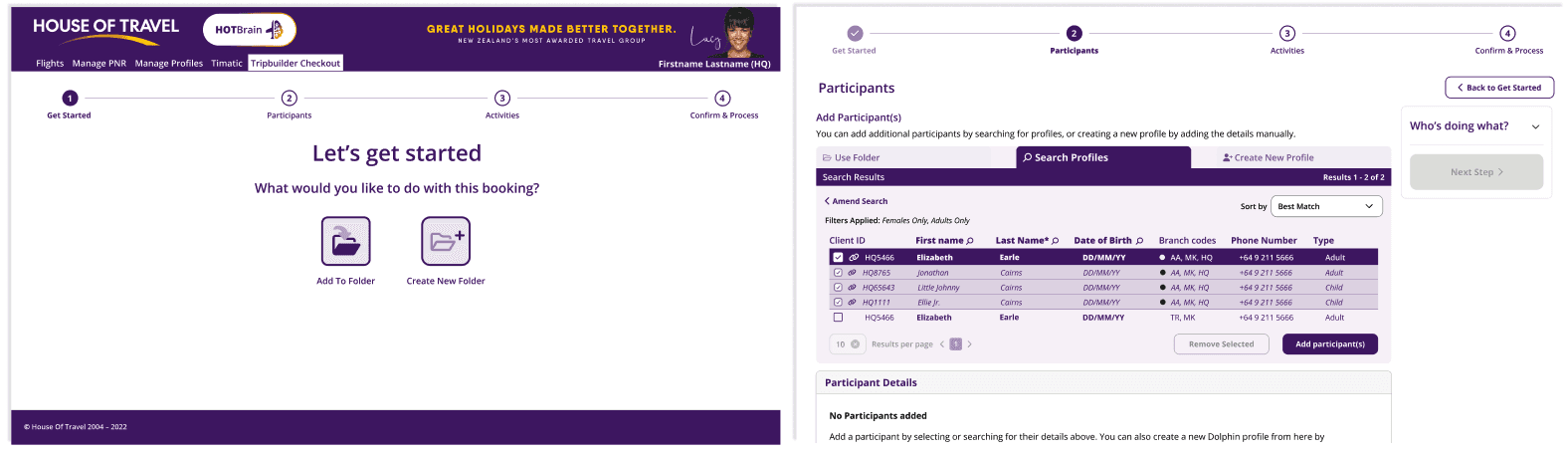
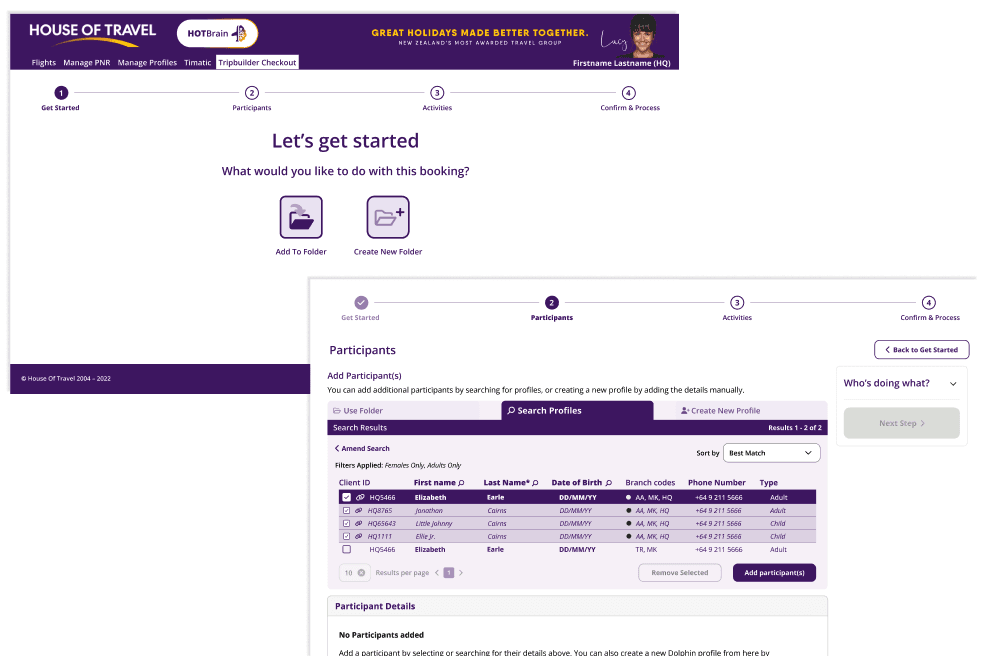
I designed a four-step checkout flow: get started, participants, activities, and confirm and process. The flow could auto-populate customer details from existing profiles, support new profile creation where needed, and keep the experience scalable for a larger booking-management tool

WHAT WAS ACHIEVED
  • Clickable wireframes moved through feedback into high-fidelity prototypes.

  • Test users responded positively, with most completing the flow first time without getting lost.

  • The feature shipped and is live for consultants using Tripbuilder.

The Requirements

The current system required the user (consultants) to manually fill out several required fields of customer information. We already had access to this information in our mid-office booking management system, so the idea was to leverage this information so the user only had to identify the correct profile, and the system would auto-populate the required fields from that. Because the customer may not have a profile set up already, we also needed the ability to manually create one, as well as to just save the information as a quote (which required a much simpler process that could then be confirmed as a full booking at a later date).

The passenger information step would hand over to an activities confirmation step, where the user would add any additional information requested by the providers. Finally, a confirmation step was required where the consultant acknowledged terms and conditions of the bookings. When the user confirmed the bookings, the system would sync the new data with the mid-office system, and send documentation to the customer in the form of an itinerary.

I started by creating a clickable prototype wireframe of the flow. After iterative feedback and adjustments, this gave way to a high-fidelity design, which were also created as a prototype to showcase to stakeholders and users.

Intended impact

Allowed consultants to utilize their current systems without adding complexity or extra areas to maintain data.

Brought several separate systems together under one process with a unified look and feel, reducing time-to-completion and increasing ease of use.

The feedback from stakeholders and test users was overwhelmingly positive, with the majority of test users able to complete the process first time without getting lost or stuck. The feature was successfully released and is now live.

This was to be the first step in creating a larger consolidated booking management tool, so it needed to be both simple and scalable as we added new features in future.

The checkout flow moved consultants through folder setup, participant selection, activities, and confirmation without forcing repeated manual data entry.

Building reusable Design Systems

Building reusable Design Systems

Building reusable Design Systems

The strongest craft signal came through three product design systems: HOT Internal Tools, Content Orchestration, and Nimble (an in-house booking tool for Corporate Travel). Each system needed to support different product contexts while keeping the underlying foundations consistent.
The systems followed an atom-to-molecule-to-template model, used semantic colour variables, and leaned on auto-layout patterns that mirrored how developers would structure containers in code. That made the files more useful as collaboration guidance, not just visual documentation.

The strongest craft signal came through three product design systems: HOT Internal Tools, Content Orchestration, and Nimble (an in-house booking tool for Corporate Travel). Each system needed to support different product contexts while keeping the underlying foundations consistent.
The systems followed an atom-to-molecule-to-template model, used semantic colour variables, and leaned on auto-layout patterns that mirrored how developers would structure containers in code. That made the files more useful as collaboration guidance, not just visual documentation.

WHAT WAS ACHIEVED
  • Reusable components for internal tools, configuration workflows, and corporate travel products.

  • Typography, colour, spacing, and interaction states documented as practical Figma foundations.

  • Template structures that helped developers inspect intent and translate layouts faster.
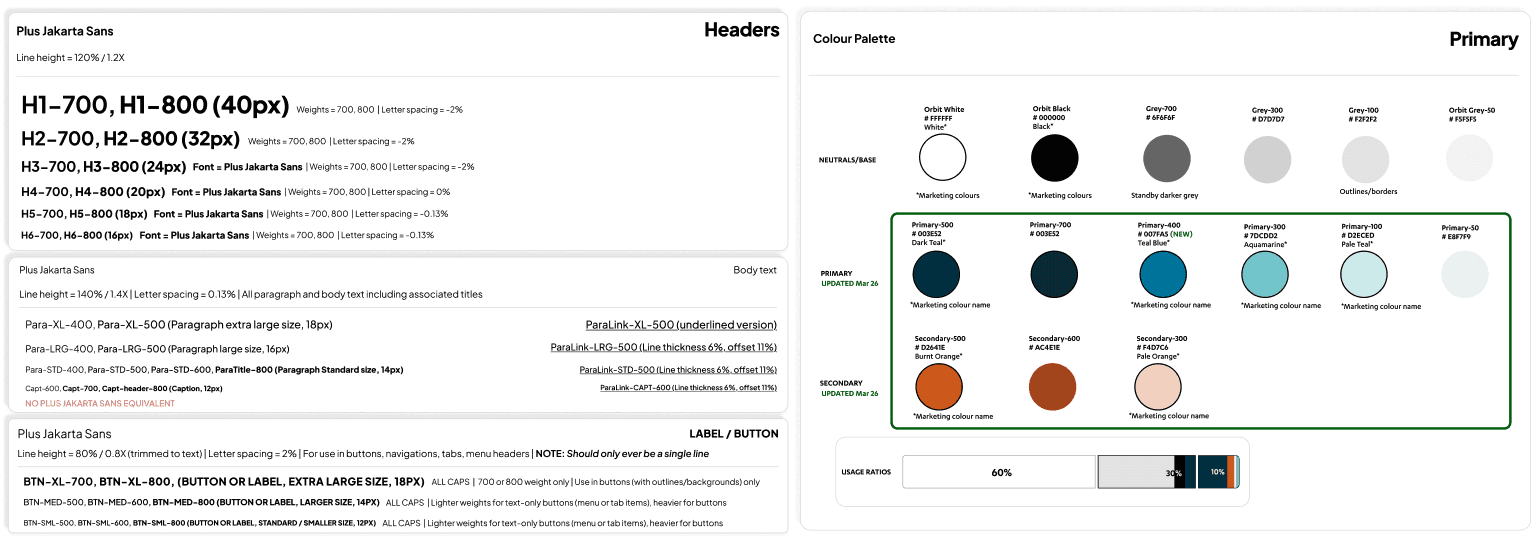
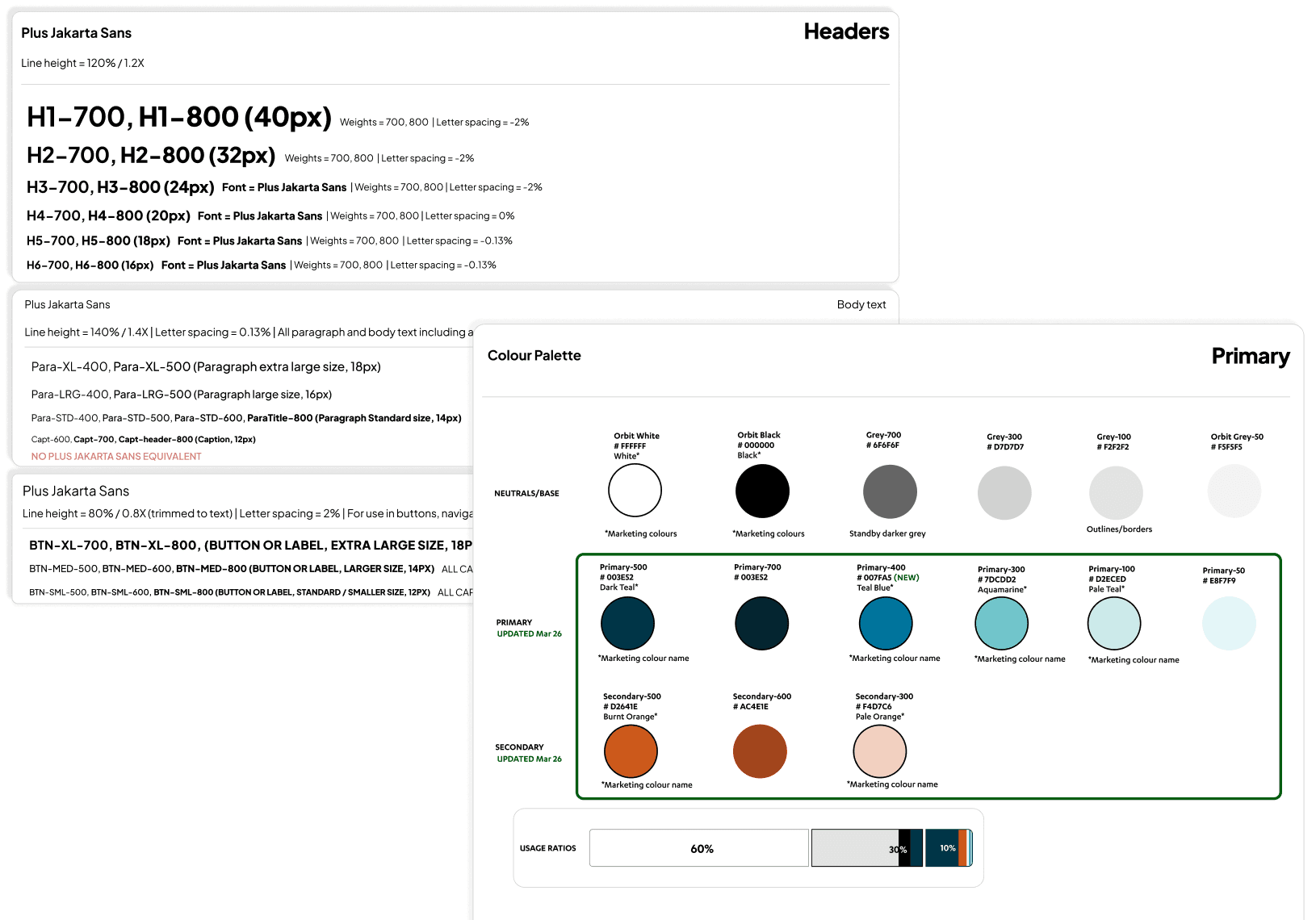
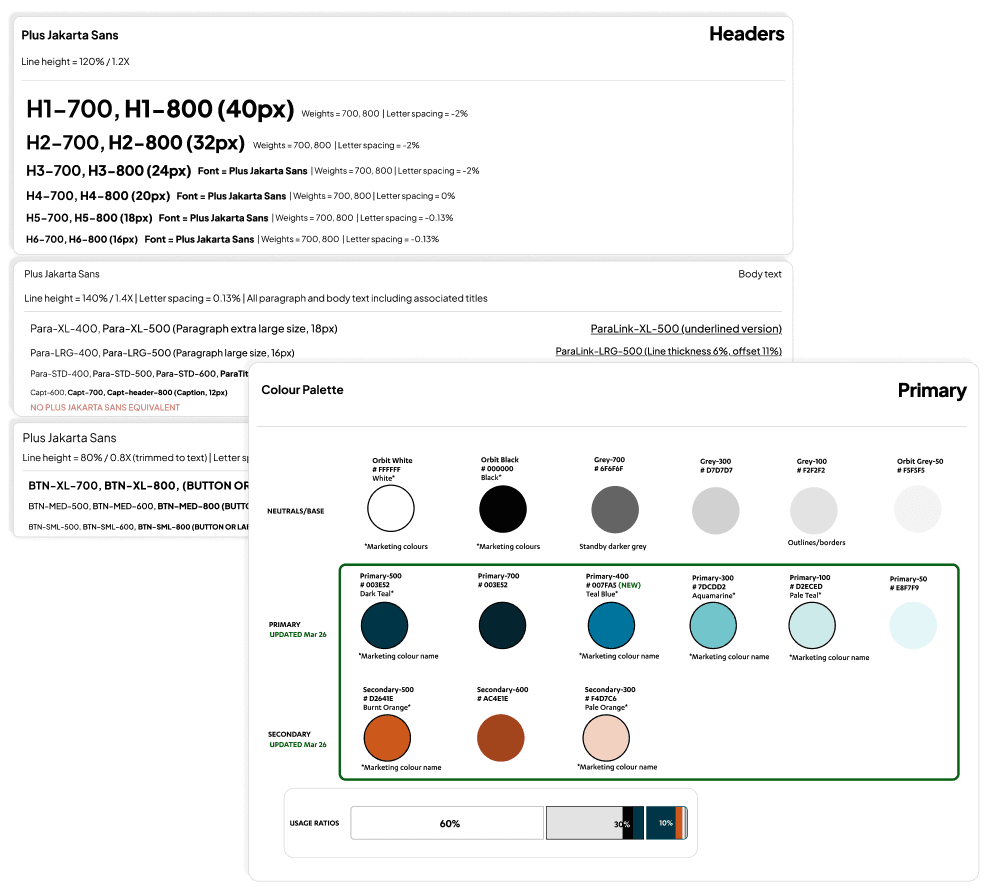
The systems translated UI foundations into practical Figma assets, with typography, colour tokens, auto-layout, and developer-friendly structure aligned across products

The systems translated UI foundations into practical Figma assets, with typography, colour tokens, auto-layout, and developer-friendly structure aligned across products

Tripbuilder Checkout API

Tripbuilder Checkout API

Tripbuilder gave travel consultants a way to manage multi-stop itinerary bookings, but the checkout experience still relied on manual entry for information the business already had in its mid-office booking system.

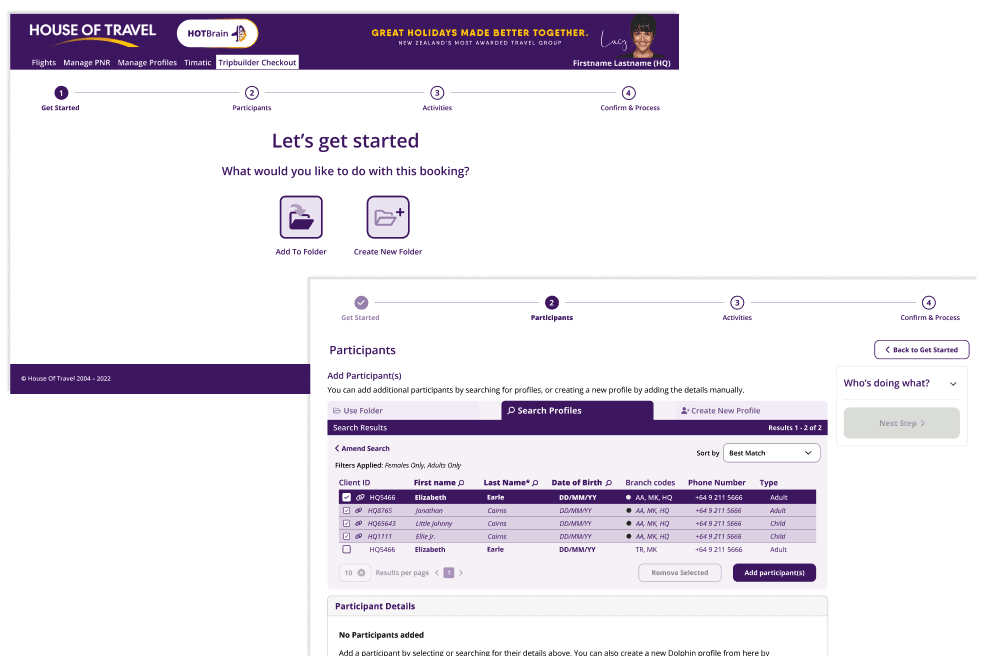
I designed a four-step checkout flow: get started, participants, activities, and confirm and process. The flow could auto-populate customer details from existing profiles, support new profile creation where needed, and keep the experience scalable for a larger booking-management tool.

Screenshots-and-device-mockups-southerncross-approvals

The checkout flow moved consultants through folder setup, participant selection, activities, and confirmation without forcing repeated manual data entry.

The checkout flow moved consultants through folder setup, participant selection, activities, and confirmation without forcing repeated manual data entry.

WHAT WAS ACHIEVED
  • Clickable wireframes moved through feedback into high-fidelity prototypes.

  • Test users responded positively, with most completing the flow first time without getting lost.

  • The feature shipped and is live for consultants using Tripbuilder.

The work displayed on this site was created by me while working for the mentioned employer, and is displayed with their permission. Any and all designs, artwork and logos displayed are copyrighted and the IP is wholly owned by the respective company.

© 2026 Ellie Earle

The work displayed on this site was created by me while working for the mentioned employer, and is displayed with their permission. Any and all designs, artwork and logos displayed are copyrighted and the IP is wholly owned by the respective company.

© 2026 Ellie Earle

The work displayed on this site was created by me while working for the mentioned employer, and is displayed with their permission. Any and all designs, artwork and logos displayed are copyrighted and the IP is wholly owned by the respective company.

© 2026 Ellie Earle